¶ Overview
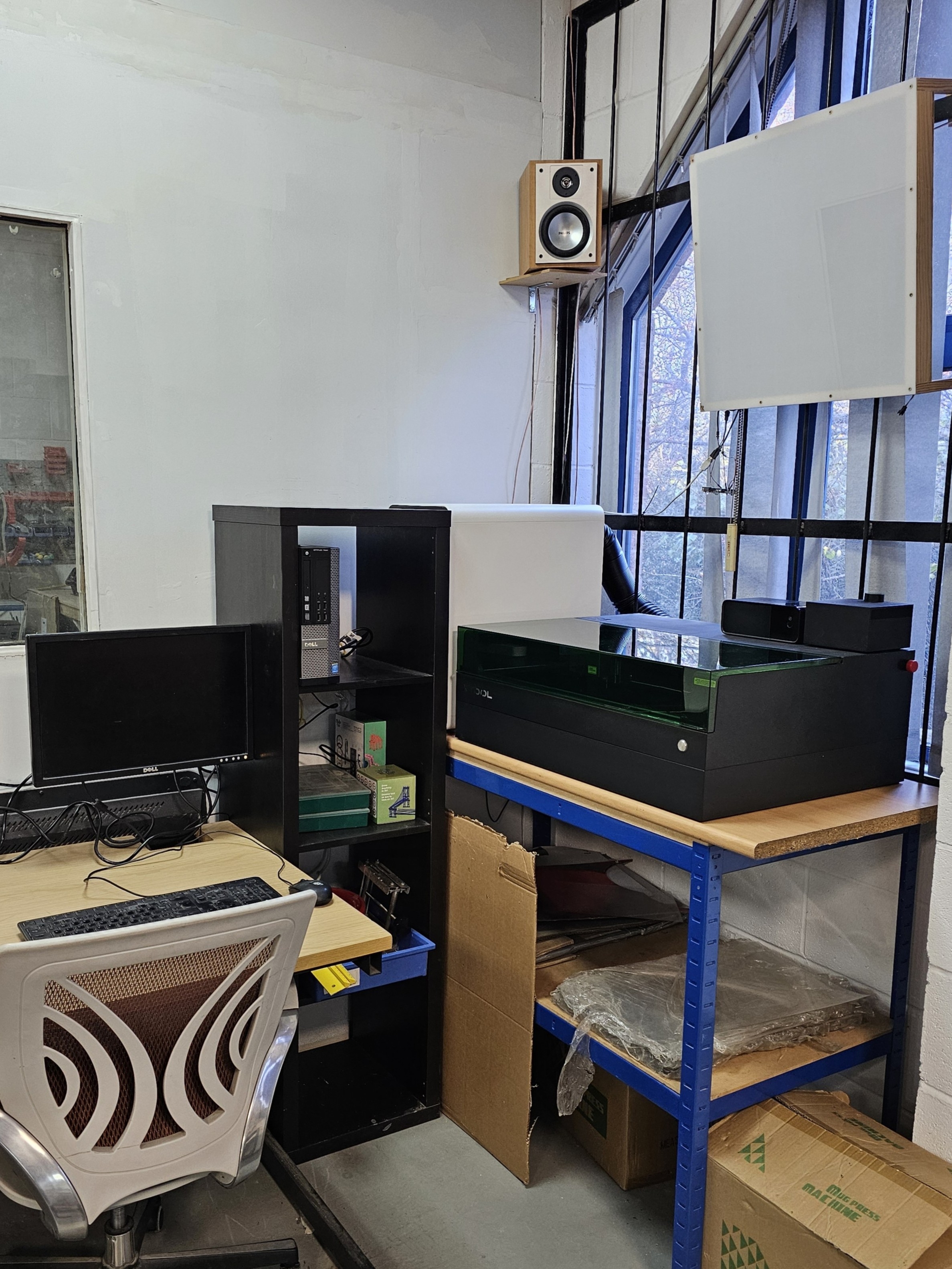
The xTool S1 is a 40W Diode Laser Cutter and Engraver. Unlike our previous CO2 lasers, this machine uses a 455nm blue light source. This means it has different material compatibilities. See below.
| Status | Access | Location | Maintainers |
|---|---|---|---|
| Operational | Induction Required | Main area | Trustees and authorised members |
The Risk Assessment can be found here
https://docs.google.com/document/d/1clCaSksDBx_qqSW4Tfupz-4eABw8q-BXQGfJ2uoyIW8/edit?usp=drive_link
The Safety Induction
https://docs.google.com/document/d/106Es4yJoK0cFQBnAfWcsZR6kLUjQ1BM5XauZNr69nZo/edit?usp=drive_link
Manufacturer Documentation
https://support.xtool.com/product/24
¶ System Configuration
Model: xTool S1 40W (Black)
Laser Source: 40W Diode (455nm Blue Light)
Working Area: 498mm x 319mm
Filtration: Smart Air Assist & Safety Pro AF2 (Smart Air Purifier) - Auto-starts with job.
Cooling: Internal Air Cooled.
Security: Physical USB Key (Must be inserted)
¶ Safety
- Class 1 Device: Safe to use without glasses ONLY if the lid is closed and the Riser Base is seated. If the orange shield is cracked, DO NOT USE.
- PVC BAN: Strictly NO PVC, Vinyl, or Artificial Leather. Burning these creates Chlorine gas which is toxic and destroys the machine.
¶ Emergency Procedures
- Fire: The machine has an automated CO2 gas suppression system. If this fails, press the Emergency Stop (Red Button on side), open the lid, and use the room's CO2 extinguisher.
- Crash: Press the Emergency Stop immediately if the head hits the frame.
- Gas Release: If the Fire Safety Set discharges, ventilate the area immediately.
¶ Accessories
The xTool S1 has a number accessories which can be used to further enhance the machines capabilities. Everything apart from the RA2 Pro 4 in 1 Rotary is installed.
| Name | Description | Best Used For |
|---|---|---|
| Honeycomb Panel | ||
| Smart Air Assist | ||
| Riser Base | ||
| Safety Pro AP2 Air Purifier | ||
| Fire Safety Set | ||
| RA2 Pro 4 in 1 Rotary |
¶ Materials
This is a Blue Light laser. It interacts with materials differently than CO2 lasers.
¶ Compatible Materials
| Material | Cut | Engrave | Notes |
|---|---|---|---|
| Wood/Plywood | Yes | Yes | Up to ~15mm (multi-pass). Excellent for cutting. |
| Opaque Acrylic | Yes | Yes | Some colours maybe more difficult than others. |
| Leather | Yes | Yes | Real Leather ONLY. NO Pleather/Faux Leather (PVC Risk) |
| Metal (Coated) | No | Yes | Anodized Aluminium or painted steel. No Bare metal |
¶ Never Use!
| Material | Cut | Engrave | Notes |
|---|---|---|---|
| Metal (Bare) | No | No | High reflection risk, no Bare metal |
| Clear Acrylic | No | No | Do Not Use. Beam passes through and damages the bed. |
| PVC / Vinyl | Banned | Banned | Dangerous never use |
| Unknown Materials | Banned | Banned | Never place unknown materials into the laser |
¶ Software
All cutting jobs must be sent via xTool Creative Studio, a cloud-based application. This is installed on all machines at the Hackspace and logged in via the Hackspace account.
Offline Mode: xTool Creative Studio allows you to download projects to use offline if internet access is unavailable.
¶ Operation Guide
-
Preparation
Check Bed: Ensure the honeycomb bed is free of debris from the previous user.
Power On: Flip the switch on the back. Ensure the Security Key is inserted.
Fire Safety Check: Verify the Fire Safety Set indicator on the laser head is Green.
Ventilation: Ensure the Safety Pro AF2 is connected and ready. -
Software (xTool Creative Space - XCS)
The PC is set up with XCS.
Import your design
Focus: Click "Auto-Measure" in XCS. The pin will drop from the laser head to touch the material.
Warning: Failing to focus is the primary cause of fire.
Framing: Click Process -> Framing. Press the button on the machine to trace the area. -
Cutting
Close the lid.
Hit Start in XCS.
Press the Blinking Button on the machine to begin.
Monitor: Watch the cut. If the AF2 extractor does not start, STOP immediately. -
Shutdown
Wait 30 seconds after the job ends for fumes to purge.
Remove your material and all scraps.
Turn off the machine.
¶ Maintenance
Trustees and authorised members only
Do not attempt to clean the lens or mirrors.
If the machine is dirty or not cutting well, report it.
¶ Resources
YouTube Links: